
This post may contain affiliate links, which means we may receive a commission at no cost to you if you make a purchase through a link.
The best smart home devices can make everyday routines feel simpler, faster, and a lot more organized. From voice-controlled speakers and smart displays to plugs, switches, hubs, and lighting, the right setup can help you manage your home with less effort and more convenience.
When selecting a product from this list, pay close attention to compatibility, ease of setup, and whether the device fits the room or task you have in mind. It also helps to check the ecosystem support you already use, like Alexa, Google Home, Apple Home, or Matter, along with details such as Wi-Fi requirements, number of outlets or display size, and whether you want a single device or a product that brings multiple functions together.
Let’s get started!
Our Top Picks at a Glance
| Product | Best For | Buy Now |
|---|---|---|
| Tapo Smart IR & IoT Hub | Universal control for IR devices and automations | Buy |
| Amazon Echo Show 15 | Kitchen hub and home organization | Buy |
| Amazon Echo Dot | Affordable Alexa speaker for everyday use | Buy |
Best Smart Home Devices
1. Best Overall: Tapo Smart IR & IoT Hub
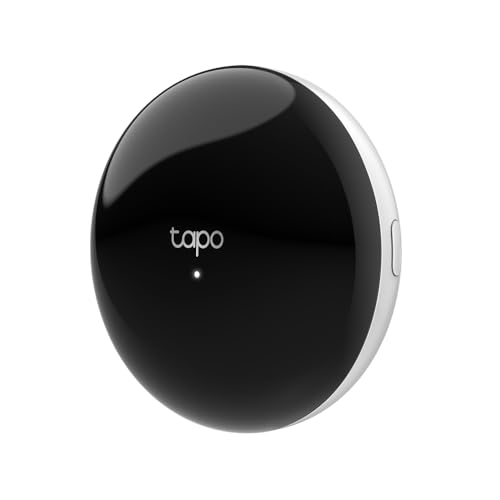
- UNIVERSAL REMOTE - SMART HUB FOR 8,000+ BRANDS: Matter-certified IR & IoT hub with built-in alarm. Control TVs, ACs, fans and other smart devices from anywhere with 2.4 GHz WiFi. Voice commands, automations and fast alerts deliver a seamless connected home.
- EXPANSIVE COMPATIBILITY ACROSS YOUR HOME: Supports 18 appliance types and thousands of IR brands—TV, Air Conditioner, Set-Top Box, Robot Vacuum, Fan, Light, Air Purifier, Humidifier, Water Heater, Electric Heater, Electric Curtain, Projector, Amplifier, DVD, Camera, Foot Tub, Drying Rack, and Box devices. Easily consolidate control for both new and legacy electronics within IR range, replacing multiple remotes with one powerful smart home hub.
- SEAMLESS VOICE ASSISTANT SUPPORT: Hands-free control with Alexa, Google Assistant or Siri through Matter. Adjust temperature, switch channels and activate routines without touching a remote or phone.

The Tapo Smart IR & IoT Hub is a strong pick for people who want one device that can link more of the home together. With Matter certification and support for a wide range of infrared brands, it is built for flexible smart home control across multiple device types.
It stands out for its universal remote functionality, voice and app control, and custom schedules and automations. If you have TVs, air conditioners, or other IR-controlled gear, this hub can help bring them into one convenient control system.
This is a smart option for users who want to reduce remote clutter and simplify daily control. It is especially appealing if you want a central hub that can support both everyday convenience and automation routines.
Pros
- Matter-certified
- Supports 8,000+ infrared brands
- Works with voice and app control
- Includes custom schedules and automations
Cons
- Best suited for IR and connected device control
- May be more than some users need for basic setups
2. Best For Kitchen Control: Amazon Echo Show 15
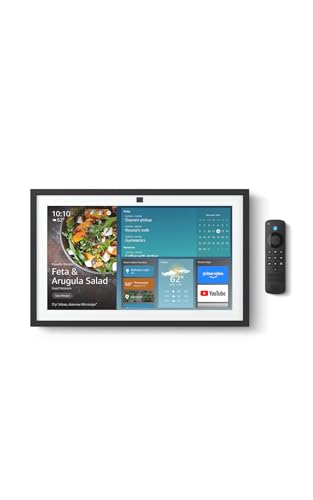
- MEET THE ALL-NEW ECHO SHOW 15 - A stunning 15.6" Full-HD (1080p) smart display that's perfect for your kitchen and ready to show you more. Use customizable widgets to keep your day on track, watch your favorite shows with Fire TV and powerful vibrant sound, and enjoy natural video calling, with 3.3x zoom and wide field of view.
- FAMILY ORGANIZATION HUB - See your top widgets at a glance, like your family’s calendars and to-do lists, local weather, smart home, and more.
- ALL YOUR FAVORITES, ALL RIGHT HERE - Built-in Fire TV unlocks endless entertainment, so you can enjoy your favorite content from thousands of apps like Prime Video, Netflix, YouTube, Apple TV, and more (subscription may be required). Fire TV remote included. Plus, now you can quickly add a device to play music with Active Media - start playing a song in the kitchen, then add the living room and bedroom on the fly.
The Amazon Echo Show 15 is designed as a large kitchen hub that can help with home organization. Its 15.6-inch Full HD display gives you plenty of space for calendars, notes, reminders, and other day-to-day information.
It also includes built-in Fire TV, which adds entertainment flexibility to the device. For households that want a central screen for schedules and media, this model brings both utility and convenience into one setup.
If the kitchen is the command center of your home, this smart display makes a lot of sense. It is built for visibility and easy family use, especially in busy spaces where quick access matters.
Pros
- Large 15.6-inch Full HD display
- Built-in Fire TV
- Useful for home organization
- Designed for Alexa+
Cons
- Higher price than smaller smart displays
- May be too large for compact spaces
3. Best For Nightstands: Amazon Echo Spot
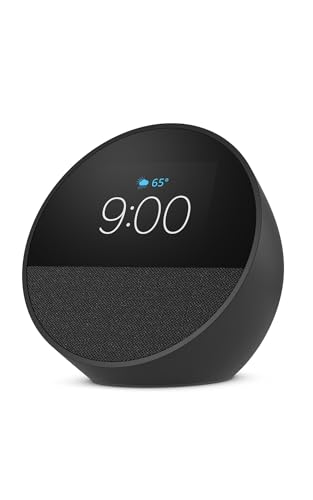
- MEET ECHO SPOT - A sleek smart alarm clock with Alexa and big vibrant sound. Ready to help you wake up, wind down, and so much more.
- CUSTOMIZABLE SMART CLOCK - See time, weather, and song titles at a glance, control smart home devices, and more. Personalize your display with your favorite clock face and fun colors.
- BIG VIBRANT SOUND - Enjoy rich sound with clear vocals and deep bass. Just ask Alexa to play music, podcasts, and audiobooks. See song titles and touch to control your music.
The Amazon Echo Spot is a compact smart alarm clock that works well on nightstands, office desks, and kitchen counters. Its smaller form factor makes it easy to place almost anywhere without taking up much room.
Because it is designed for Alexa+, it fits naturally into an Alexa-based home. It is a simple way to add voice control, alarms, and quick information in spaces where a larger display would feel unnecessary.
For people who want smart features in a small footprint, the Echo Spot is a practical choice. It focuses on everyday convenience without overwhelming the room.
Pros
- Compact design
- Good for nightstands and desks
- Works as a smart alarm clock
- Designed for Alexa+
Cons
- Smaller display than full-size smart screens
- Not intended as a central home hub
4. Best Value Smart Plug: TP-Link Tapo Smart Plug Mini

- 【Matter: All-Round Compatibility】With Matter, users are no longer tied to specific platforms and works with all certified smart home platforms, such as Apple Home, Amazon Alexa, Google Home and Samsung SmartThings. You can control all your smart home devices from a single app, reducing the need for multiple apps for different devices.
- 【Matter: Smooth LAN Control】All Matter-certified devices in your local area network (LAN) will work smoothly even when your home internet goes offline. Matter allows effective communication directly between devices, without the need for a specific 'forwarding' device. For example, a Matter smart switch or sensor can turn on/off a Matter bulb directly without being connected to a cloud service, or other specific action. Once configured, communication and control between Matter devices can be achieved directly on the local network.
- 【Matter: Future-Proofing】Matter devices will be compatible with future updates and advancements in technology, ensuring that your smart home system remains up-to-date and compatible with new devices and features.
The TP-Link Tapo Smart Plug Mini is an easy way to make ordinary devices feel smarter. With a compact design and Matter support, it brings simple control to lamps, fans, and other plug-in appliances.
This 3-pack offers strong value for households that want multiple smart plug points without overcomplicating setup. It works with Apple Home, Alexa, and Google Home, which makes it a versatile choice for mixed ecosystems.
If you want a budget-friendly entry into smart home automation, this pack is a solid place to start. It is especially helpful for turning basic routines into app- and voice-controlled actions.
Pros
- Compact design
- Matter supported
- Works with Apple Home, Alexa, and Google Home
- 3-pack adds good value
Cons
- 2.4G Wi-Fi only
- Best for plug-in devices rather than whole-home control
5. Best For Larger Display: Amazon Echo Show 11
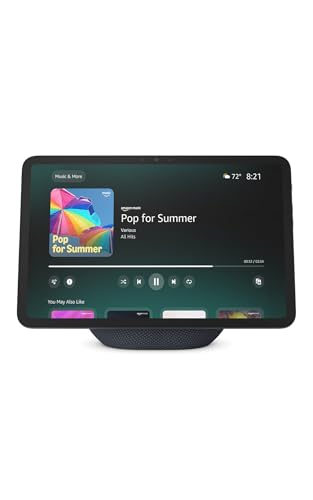
- New size, more viewing area: The 11“ smart display features a vibrant Full-HD touchscreen with 60% more viewing area versus Echo Show 8 (2025 release), built-in smart home hub, AZ3 Pro chip for powerful performance, and Omnisense technology for highly personalized experiences.
- Content looks and sounds incredible: Watch shows on Prime Video, Netflix, and more on the vibrant Full-HD 11" screen and enjoy room-filling spatial audio, crisper vocals, wider sound stage, and up to 2x bass versus Echo Show 8 (2023 release). With Alexa+, find the name of that song you love and discover new shows based on your preferences.
- Your everyday assistant: The 11" display makes it easy to see recipes and calendars at a glance, find meal inspo, and manage your shopping lists. With Alexa+, find recipes based on foods you love, make reservations, order groceries, and more.
The Amazon Echo Show 11 offers a vibrant Full-HD 11-inch display with more viewing area than smaller smart screens. It is built for people who want a clear visual interface without jumping all the way to the largest screen size.
With spatial audio and Alexa+ support, it can serve as a helpful screen for entertainment, information, and daily household management. Its size makes it a good middle-ground option for many rooms.
This model works well if you want a smarter display for regular use and prefer a balanced size that fits a wider range of spaces. It is a flexible pick for shared family areas.
Pros
- 11-inch Full-HD display
- Spatial audio
- Good balance of size and usability
- Designed for Alexa+
Cons
- Pricier than smaller displays
- May still be large for tight spaces
6. Best Compact Smart Display: Amazon Echo Show 5

- Alexa can show you more - Echo Show 5 includes a 5.5” display so you can see news and weather at a glance, make video calls, view compatible cameras, stream music and shows, and more.
- Small size, bigger sound – Stream your favorite music, shows, podcasts, and more from providers like Amazon Music, Spotify, and Prime Video—now with deeper bass and clearer vocals. Includes a 5.5" display so you can view shows, song titles, and more at a glance.
- Keep your home comfortable – Control compatible smart devices like lights and thermostats, even while you're away.
The Amazon Echo Show 5 is a compact smart display designed for smaller spaces like desks, bedrooms, or entryway tables. It is a straightforward option for users who want the benefits of a screen without the bulk of a larger unit.
Its updated sound profile includes 2x the bass and clearer audio, which improves the overall experience for alarms, music, and quick video views. It is also designed for Alexa+, making it a familiar fit for Alexa households.
This model is a good choice for users who want a practical smart display at a more approachable size. It keeps things simple while still offering a useful screen-based smart home experience.
Pros
- Compact and space-saving
- 2x the bass and clearer sound
- Useful for bedrooms and desks
- Designed for Alexa+
Cons
- Smaller display limits viewing area
- Not ideal for central family use
7. Best For Richer Sound: Amazon Echo Dot Max
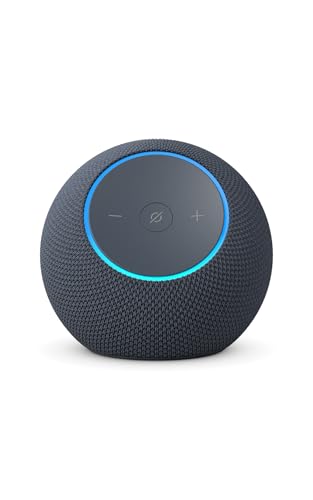
- Meet Echo Dot Max: Experience rich room-filling sound that automatically adapts to your space and fine-tunes playback. Features a built-in smart home hub and Omnisense technology for highly personalized experiences.
- Music to your ears: With nearly 3x the bass versus Echo Dot (2022 release), it fits beautifully in any space, delivering your personal sound stage with deep bass and enhanced clarity. Listen to streaming services, such as Amazon Music, Apple Music, Spotify, and SiriusXM. Encore!
- Do more with device pairing: Connect compatible Echo smart speakers and smart displays in different rooms, or pair with a second Echo Dot Max to enjoy even richer sound. Pair your Echo Dot Max with compatible Fire TV devices to create a home theater system that brings scenes to life.
The Amazon Echo Dot Max is built for users who want a stronger audio experience in a compact speaker. It offers room-filling sound and nearly 3x bass, making it a step up from basic smart speakers for listening-focused daily use.
It is positioned well for living rooms and medium-sized spaces where you want better sound without going to a larger home audio setup. With Alexa+ support, it also works as a convenient voice assistant.
This is a smart choice if sound quality matters to you as much as voice control. It delivers more presence while still staying manageable in size.
Pros
- Room-filling sound
- Nearly 3x bass
- Works well in medium-sized spaces
- Designed for Alexa+
Cons
- Higher price than the standard Dot
- Focused more on audio than visual smart home control
8. Best Budget Speaker: Amazon Echo Dot
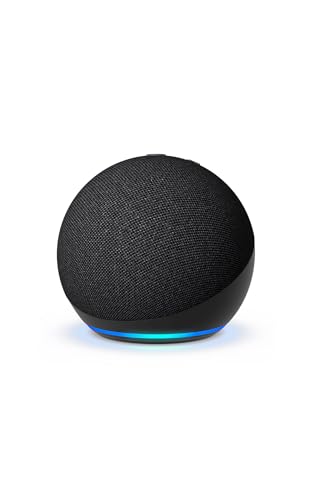
- Your favorite music and content – Play music, audiobooks, and podcasts from Amazon Music, Apple Music, Spotify and others or via Bluetooth throughout your home.
- Alexa is happy to help – Ask Alexa for weather updates and to set hands-free timers, get answers to your questions and even hear jokes. Need a few extra minutes in the morning? Just tap your Echo Dot to snooze your alarm.
- Keep your home comfortable – Control compatible smart home devices with your voice and routines triggered by built-in motion or indoor temperature sensors. Create routines to automatically turn on lights when you walk into a room, or start a fan if the inside temperature goes above your comfort zone.
The Amazon Echo Dot remains a popular entry-level smart speaker for bedrooms, dining rooms, and offices. It offers a compact way to add Alexa voice control to everyday spaces without taking up much room.
Its vibrant sound makes it a useful speaker for music, alarms, timers, and general voice assistant tasks. For many households, it is one of the easiest ways to start building a smart home.
If you want an affordable and familiar smart speaker, this model delivers solid everyday value. It is a practical buy for users who want simple voice assistance in a small format.
Pros
- Affordable
- Compact and easy to place
- Good for bedrooms and offices
- Designed for Alexa+
Cons
- Smaller sound than larger Echo models
- Limited visual interaction
9. Best Control Panel: Amazon Echo Hub
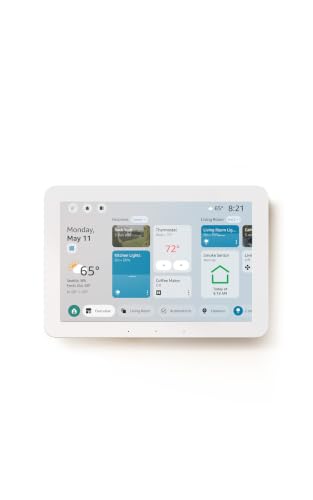
- Echo Hub — An easy-to-use Alexa-enabled control panel for your smart home devices—just ask Alexa or tap the display to control lights, smart plugs, camera feeds, and more.
- Streamline your smart home — Customize the controls and widgets, displayed on your dashboard to quickly adjust devices, view cameras, start routines, and more.
- Works with thousands of Alexa compatible devices — Compatible with thousands of connected locks, thermostats, speakers, and more. WiFi, Bluetooth, Zigbee, Matter, Sidewalk and Thread devices sync seamlessly with the built-in smart home hub.
The Amazon Echo Hub is an 8-inch smart home control panel designed to help centralize device management. It is especially useful for homes with multiple connected devices that need easy access in one place.
Because it is compatible with thousands of devices, it can function as a visual control center for your smart setup. Designed for Alexa+, it fits naturally into homes that already rely on Amazon’s ecosystem.
This is a strong pick for people who want a dedicated panel instead of a speaker-first device. It works best when your goal is control, visibility, and fast access to smart home actions.
Pros
- Dedicated 8-inch control panel
- Compatible with thousands of devices
- Useful central hub for smart home management
- Designed for Alexa+
Cons
- Not a general-purpose smart display
- Best value depends on having multiple connected devices
10. Best Easy Setup Plug: Amazon Smart Plug
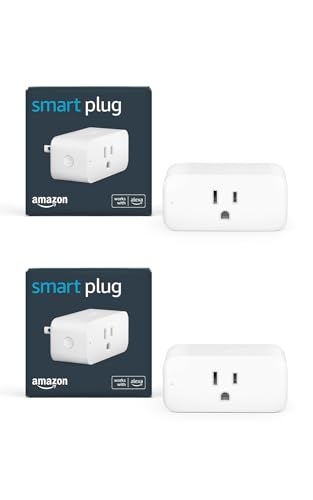
- The information below is per-pack only.
- Amazon Smart Plug works with the Alexa app and compatible Alexa devices to add voice control to any electrical outlet.
- Simple setup - No smart home hub required. Just plug it in, open the Alexa app and follow the stress-free directions to get started in minutes.
The Amazon Smart Plug is a simple way to bring voice control to everyday appliances. With easy setup and Alexa support, it is one of the most approachable smart home upgrades on the list.
This 2-pack makes it convenient to automate two different devices right away. It works well for product types that don’t need a full smart replacement, such as lamps or small household electronics.
For shoppers who want a no-fuss smart home entry point, this is an easy pick. It focuses on convenience and immediate utility rather than advanced features.
Pros
- Simple setup
- Works with Alexa
- 2-pack for added flexibility
- Good for everyday household items
Cons
- Best for Alexa users
- Less versatile than Matter-based plugs
11. Best Light Switch Pack: Kasa Smart Light Switch HS200P3

- App-Guided Install: The Kasa or Tapo app guides you through step-by-step setup. Requires neutral wiring and 2.4 GHz Wi-Fi. Consulting an electrician is recommended if you’re unfamiliar with electrical wiring
- Control from Anywhere: Monitor your light status. Turn electronics on and off from anywhere with your smartphone using the Kasa app, whether you are at home, in the office or on vacation
- Voice Control: Enjoy the hands-free convenience of controlling the lights in your home with your voice via Amazon Alexa or Google Assistant; perfect for times when your hands are full or entering a dark room
The Kasa Smart Light Switch HS200P3 is built for users who want to control their lighting from the wall switch itself. It is a practical upgrade for homes where a smart switch makes more sense than individual smart bulbs.
This model works with Alexa and Google Home and requires a neutral wire, so it is important to check your wiring before buying. With no hub required, it keeps the setup relatively straightforward for compatible homes.
If you want to modernize room lighting in a meaningful way, this pack offers a useful solution. It is especially effective for homes where multiple switches need attention at once.
Pros
- Works with Alexa and Google Home
- No hub required
- 3-pack provides multiple switch upgrades
- UL certified
Cons
- Needs neutral wire
- Single pole only
12. Best Matter Switch: TP-Link Tapo Matter Smart Light Switch

- 【Matter: All-Round Compatibility】With Matter, users are no longer tied to specific platforms and works with all certified smart home platforms, such as Apple Home, Amazon Alexa, Google Home and Samsung SmartThings. You can control all your smart home devices from a single app, reducing the need for multiple apps for different devices.
- 【Matter: Smooth LAN Control】With Matter, all devices in your LAN communicate efficiently, even if your internet goes offline. A direct device-to-device interaction eliminates the need for a 'forwarding' device. For instance, a Matter switch or sensor can control a Matter bulb without any cloud service. Once set up, direct communication between Matter devices on your local network is easily achieved.
- 【Matter: Multi-Admin】Matter also allows you to control devices via multiple smart home systems at the same time through its Multi-Admin feature. That means you can turn on your lights from the SmartThings app on a Samsung smartphone, dim them by asking Alexa on an Amazon Echo speaker, and then turn them off from the Apple Home app on an iPad.
The TP-Link Tapo Matter Smart Light Switch is another strong lighting upgrade, this time with Matter support and voice control across Siri, Alexa, and Google Home. It is designed to fit into broader smart home ecosystems with fewer compatibility concerns.
Its timer and schedule features can make lighting more convenient day to day, while the easy guided install aims to simplify the setup process. Like many smart switches, it requires a neutral wire and works as a single-pole switch.
This is a thoughtful choice for households that want cross-platform support in a wall switch format. It brings together practical control and modern compatibility.
Pros
- Matter supported
- Works with Siri, Alexa, and Google Home
- Timer and schedule support
- Easy guided install
Cons
- Neutral wire required
- Single pole only
13. Best For Camera Management: Tapo CentralHub
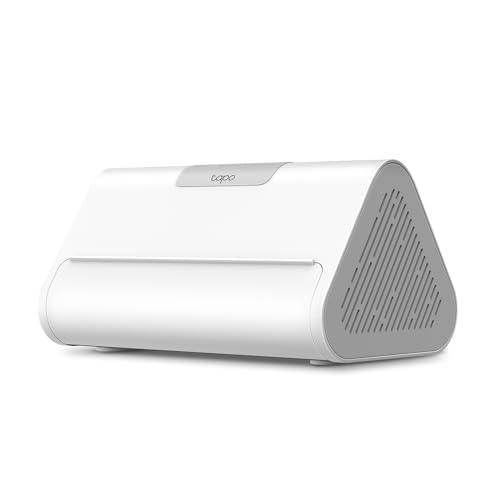
- 𝐂𝐞𝐧𝐭𝐫𝐚𝐥𝐢𝐳𝐞𝐝 𝐒𝐦𝐚𝐫𝐭 𝐇𝐨𝐦𝐞 𝐇𝐮𝐛 - Tapo H500 connects and controls up to 16 Tapo cameras and 64 Tapo Sub-G sensors, unifying your smart home IoT devices on a single platform. Note: Supports up to 4 cameras for continuous recording.
- 𝐄𝐱𝐩𝐚𝐧𝐝𝐚𝐛𝐥𝐞 𝐋𝐨𝐜𝐚𝐥 𝐒𝐭𝐨𝐫𝐚𝐠𝐞 – Enjoy 16GB of built-in storage plus support for added storage with no capacity limit via a 2.5'' SATA HDD/SSD (5V power/10W max operating watts, sold separately). Access recordings without subscriptions or having to buy separate microSDs for each camera.
- 𝐀𝐝𝐝𝐬 𝐅𝐚𝐜𝐢𝐚𝐥 𝐑𝐞𝐜𝐨𝐠𝐧𝐢𝐭𝐢𝐨𝐧 𝐭𝐨 𝐄𝐱𝐢𝐬𝐭𝐢𝐧𝐠 𝐓𝐚𝐩𝐨 𝐂𝐚𝐦𝐞𝐫𝐚𝐬 - Filter out familiar faces and get alerts only when an unfamiliar person is detected, reducing unnecessary notifications.
The Tapo CentralHub is designed for homes that want more centralized management of Tapo cameras and sensors. It can connect up to 16 Tapo cameras and 64 sub-G sensors, making it a specialized control point for larger setups.
It includes 16GB of built-in storage and offers a 2.5-inch SATA expandable storage option. The hub is also built to improve camera AI accuracy, which can matter for users who rely heavily on monitoring devices.
If your smart home includes several Tapo cameras and sensors, this hub is worth a close look. It is especially useful when local storage and system organization are priorities.
Pros
- Supports multiple Tapo cameras and sensors
- 16GB built-in storage
- Expandable storage option
- Improves camera AI accuracy
Cons
- Best suited to Tapo ecosystems
- Less useful for users without cameras or sensors
14. Best Power Strip: Kasa Smart Plug Power Strip HS300
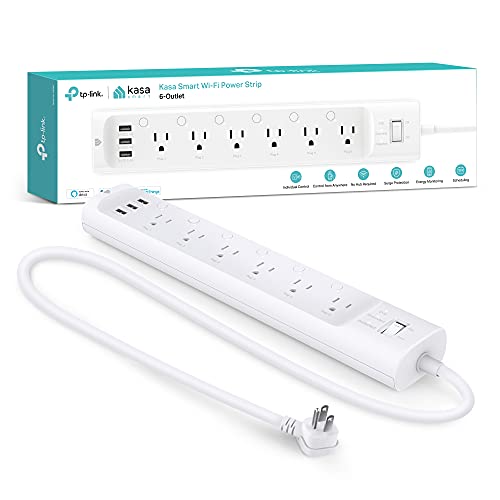
- 6 smart outlets: Independently control 6 smart outlets, and charge 3 devices with built in USB ports; Ideal for controlling electronics in your home, home office, or small business
- Surge protection: ETL certified surge protection shields sensitive electronics and appliances from sudden power surges that can occur during weather storms and cause irreparable damage
- Energy monitoring : Monitor how much energy devices connected to the power strip consume; Check on each one from your Kasa smart app and turn off ones that are using too much power
The Kasa Smart Plug Power Strip HS300 is a powerful option for desks, entertainment areas, and home office setups. It offers six individually controlled smart outlets along with three USB ports, giving you a lot of flexibility in one unit.
Because it works with Alexa and Google Home and requires no hub, it is fairly easy to incorporate into an existing smart home. The surge protector design also adds practical protection for connected electronics.
This is a smart buy for anyone managing multiple devices in one place. It is especially useful when you want individual outlet control without buying several separate smart plugs.
Pros
- Six individually controlled smart outlets
- Three USB ports
- Surge protector included
- Works with Alexa and Google Home
Cons
- Bulkier than a standard smart plug
- Best for clustered device setups
15. Best Smart Lighting Pack: Govee Smart Light Bulbs
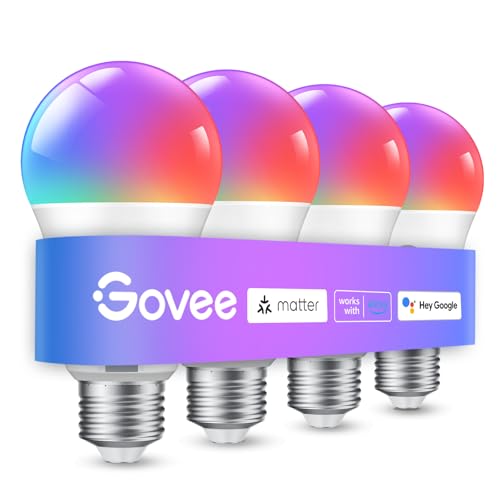
- 16 Million DIY Colors: Govee smart light bulbs own millions of color and 54 preset scene modes, you can explore your favored one or pick one suits your moods most, bringing yourself a real fantastic lighting experience(Working Voltage: AC 120V).
- Music Sync: Our smart light bulbs change color and brightness simultaneously when sounds are detected by the microphone on your phone. Note: only works when the microphone is not occupied. Download Govee Home App and enable microphone permissions.
- Smart Control: Govee color changing light bulbs make it possible to control your bulbs with simple voice commands. And you'd also feel free to turn your smart light bulbs on/off, adjust brightness, or change the colors, set scenes via Govee Home App. (Note: Doesn't support 5G)
The Govee Smart Light Bulbs are a colorful option for users who want flexible lighting control. With 16 million colors, Alexa and Google Assistant compatibility, and WiFi plus Bluetooth support, they are built for expressive home lighting.
The music sync feature adds another layer of fun for entertainment spaces, while the 800-lumen output suits everyday room use. The 4-pack makes it easier to outfit multiple lamps or fixtures at once.
If your goal is to turn lighting into a more dynamic part of your home, this pack is a compelling choice. It balances convenience, customization, and broad appeal for many rooms.
Pros
- 16 million colors
- Works with Alexa and Google Assistant
- WiFi and Bluetooth support
- Music sync feature
Cons
- Best for users who want color customization
- May be more than needed for simple white-light use
Buying Guide
Compatibility
Start by checking whether the device works with your preferred ecosystem. Some products are designed for Alexa, while others support Google Home, Apple Home, Siri, or Matter. Choosing a product that matches your current setup can make everything easier to manage.
Installation and Setup
Look at how much effort the device will take to install. Smart plugs are usually the simplest, while smart switches may require wiring and a neutral wire. If you want a faster upgrade, go with devices that are easier to set up right away.
Room and Use Case
Think about where the device will go and what role it will serve. A smart display works well in a kitchen or common area, a compact speaker suits a bedroom, and a control panel makes sense in a home with many connected devices. Matching the product to the room helps you get more value from it.
Automation Features
Schedules, timers, and automations can make a smart home feel truly useful. If you want lights, plugs, or hubs to respond automatically, check for these features before buying. They can save time and make everyday routines easier.
Size and Design
Design matters more than many buyers expect. Large smart displays can be great for visibility, but smaller devices may fit better in bedrooms, offices, or tight counters. Make sure the product’s size works with the space you have available.
Frequently Asked Questions
What makes a smart home device worth buying?
A smart home device is worth buying when it makes a daily task easier, saves time, or adds flexibility to your home. The best devices are simple to use, compatible with your setup, and useful in the room where you place them.
Do I need a hub for smart plugs or smart switches?
Not always. Some smart plugs and switches work without a hub, while others are designed to pair with ecosystem support like Matter or Alexa. Always check the product details before assuming a hub is required.
Are Matter-certified devices better?
Matter-certified devices can be a good choice because they are built for broader compatibility across supported ecosystems. If you want flexibility and easier home integration, Matter is often a helpful feature to look for.
Which product is best for beginners?
Smart plugs are usually the easiest starting point for beginners. They are simple to set up and can quickly add voice or app control to everyday appliances without requiring major changes.
Should I choose a smart display or a smart speaker?
If you want visual information like calendars, video, or a dashboard-style interface, a smart display is the better choice. If you mainly want voice control and audio, a smart speaker may be the better fit.
Conclusion
The Best Smart Home Devices depend on what you want your home to do for you. Some shoppers will get the most value from a simple smart plug, while others may prefer a display, hub, switch, or lighting upgrade that transforms how a room functions.
If you want the most flexible all-around pick, the Tapo Smart IR & IoT Hub stands out for broad control and Matter support. For a more visual and family-friendly setup, the Amazon Echo Show models offer strong smart display options, while the Echo Dot and smart plugs remain easy ways to build a practical smart home on a budget.
Whichever route you choose, the best results come from matching the device to your space, ecosystem, and everyday habits. That way, your smart home feels useful from day one.