

This post may contain affiliate links, which means we may receive a commission at no cost to you if you make a purchase through a link.
If you’re searching for the Best Golf Simulator For Home, you’ll quickly find that the right setup depends on how you want to practice, how much space you have, and how immersive you want the experience to feel. Some products are built as complete studio-style packages, while others focus on portability, swing tracking, or simple net-and-mat practice.
When choosing from these products, pay close attention to the type of simulator you want first. Launch monitors, enclosure packages, impact screens, mats, and portable swing analyzers all solve different needs. It’s also smart to consider room size, compatibility with your devices or software, ease of setup, and whether you want a full enclosed hitting bay or a lighter practice solution.
Let’s get started!
Our Top Picks at a Glance
| Product | Best For | Buy Now |
|---|---|---|
| SkyTrak ST MAX Standard Studio Package | Best Premium Complete Home Simulator | Buy |
| GoSports Golf Simulator Enclosure Nets | Best Large Enclosure Option | Buy |
| Rapsodo MLM2PRO Launch Monitor | Best Portable Launch Monitor Choice | Buy |
Best Golf Simulator For Home
1. Best Premium Complete Home Simulator: SkyTrak ST MAX Standard Studio Package
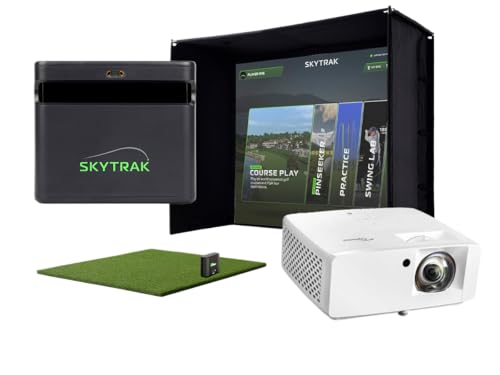
- All-In-One Golf Simulator Studio: Comes complete with the SkyTrak ST MAX launch monitor, durable enclosure, impact screen, steel frame, premium 5×5 hitting mat, and ZW350ST short-throw projector — everything to build your indoor golf setup quickly.
- Pro-Grade Launch Monitor Technology: Dual Doppler radar and photometric camera system deliver high-precision ball & club data so you can practice with confidence and track key performance metrics.
- Speed Training Powered by GOLFTEC: Exclusive training tools help golfers build swing speed and distance, accelerate improvement, and master key game fundamentals.
The SkyTrak ST MAX Golf Simulator Standard Studio Package is one of the most complete home simulator setups in this list. It combines a launch monitor, enclosure, screen, hitting mat, projector, and trial software into a single package, making it especially appealing for golfers who want a ready-to-build studio-style experience at home.
This package is designed for users who want a more serious indoor golf environment without having to piece together every component separately. Since it includes multiple core simulator elements, it can save time when planning a home setup and reduce the guesswork that often comes with building a system from scratch.
With a 5×5 hitting mat and a bundled projector, this option is clearly aimed at golfers who want a larger, more complete indoor practice station. If you’re looking for an all-in-one route and are prepared for a premium investment, this is one of the strongest choices in the lineup.
Pros
- Complete home simulator package
- Includes launch monitor, enclosure, screen, mat, projector, and trial software
- Designed for a serious indoor setup
- Convenient for buyers who want an all-in-one system
Cons
- High price point
- Requires more room than simpler training products
2. Best Premium Studio Package: SkyTrak ST MAX Ultimate Studio Package
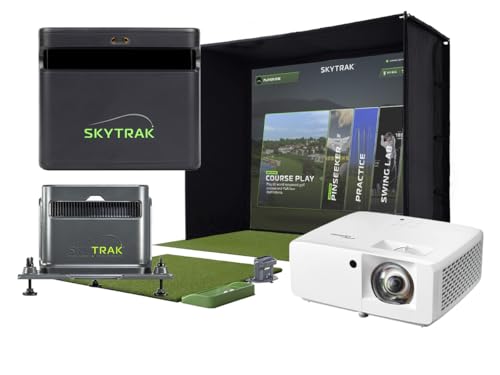
- SKYTRAK ST MAX Launch Monitor – Delivers tour-level accuracy with dual Doppler radar, photometric cameras, and GOLFTEC Speed Training to help you build speed and distance - plus dual ports so you can charge and play without interruption.
- MEASURE BEFORE YOU BUY: Studio 10 fits spaces 10' W x 8'6" H x 5'4" D | Studio 12 fits 12' W x 8'6" H x 5'4" D | Studio 13 Deep fits 13' W x 10' H x 10' D. Before ordering, swing a club in your intended space — you'll need comfortable clearance above and around your full swing. Ceiling height minimums: 8'6" for Studio 10 & 12, 10' for Studio 13 Deep.
- Enclosure, Screen, and Frame – Built-to-last with a sturdy frame and high-impact stretch screen that makes installation easier and fits perfectly in your space.
The SkyTrak ST MAX Golf Simulator Ultimate Studio Package is another high-end home simulator option built for a full indoor golf experience. It brings together a dual radar and photometric launch monitor along with speed training, impact screen, HD projector, hitting mat, and enclosure.
This package is clearly aimed at golfers who want a premium studio environment rather than a basic practice net. Because it includes so many components in one bundle, it may appeal to buyers who want to streamline setup and focus on playing and training instead of sourcing separate parts.
Its overall positioning makes it a strong fit for dedicated home golfers who want a feature-rich simulator package. The price places it in the luxury range, but the included components make it an attractive option for a complete garage or indoor build.
Pros
- Very complete premium package
- Includes launch monitor, impact screen, HD projector, mat, and enclosure
- Built for indoor or garage use
- Good for a full studio-style setup
Cons
- Very expensive
- Not ideal for smaller budgets
3. Best Large Enclosure Option: GoSports Golf Simulator Enclosure Nets

- COMMERCIAL GRADE HEAVY DUTY IMPACT SCREEN: Built to withstand high speed golf ball impacts for lasting durability; Multi layer design reduces rebound and provides a smooth projection surface for all major launch monitors
- EASY INSTALLATION: Set up your golf simulator enclosure effortlessly with quick installation hardware and easy to read instructions; Perfect for those eager to enjoy golf at home with the best golf simulator accessories, ensuring max practice time",
- PREMIUM GOLF SIMULATOR ENCLOSURE SYSTEM: Crafted with reinforced materials and precision construction for lasting durability; Engineered to meet strict quality standards for reliable performance in dedicated home golf simulator setups

The GoSports Golf Simulator Enclosure Nets package is a complete frame-and-screen kit designed for indoor home golf training. It is available in multiple sizes, including 10×8 ft, 12×9 ft, and 14×8 ft, which makes it easier to match different rooms and garage spaces.
As an enclosure-focused product, this is a strong choice for golfers who already have or plan to use a launch monitor and want a dedicated hitting bay. The complete set approach makes it a solid foundation for a home simulator build, especially if you want a more immersive practice area.
Because sizing matters a lot in home golf setups, the multiple enclosure options are especially valuable. This product is best suited to buyers who want a strong enclosure system and are willing to build around it with other simulator components.
Pros
- Complete enclosure set with frame and HD impact screen
- Available in multiple sizes
- Suitable for indoor home golf training
- Good base for a custom simulator build
Cons
- Does not include a launch monitor
- Larger setup may require significant space
4. Best Enclosure Kit With Safety Padding: Golf Simulator Enclosure Kit
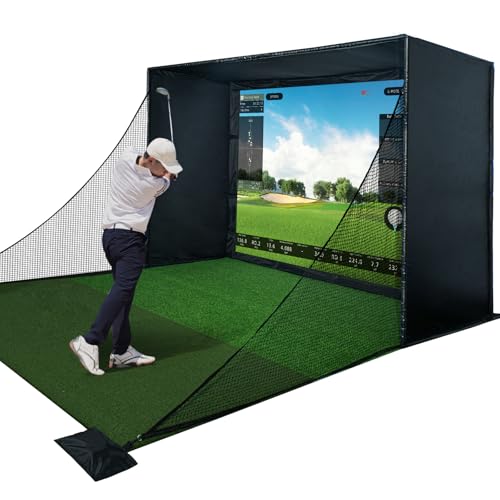
- Complete Golf Simulator Enclosure Kit – This kit includes everything you need for a true home golf simulator setup. With a sturdy steel frame, blackout curtain, golf impact screen, full safety padding, and golf nets, it's here to build your dream indoor golf simulator space with zero hassle.
- Triple-Layer Commercial Golf Impact Screen – Most simulator screens can’t keep up. Ours is made from a premium 3-layer material that absorbs shock, reduces sound, and delivers crisp HD visuals. Built for fast golf ball speeds and heavy use, it’s the upgrade your golf simulator deserves.
- All-Around Safety, Smart Rebound Control – We’ve added thick sponge padding and full-coverage foam to reduce ricochets by over 50%. Safer rebounds and a more controlled ball return give you the freedom to train harder in your golf simulator net or golf hitting net setup.
This Golf Simulator Enclosure Kit is built around a premium HD impact screen, full safety padding, and a blackout curtain. It is designed as a home golf simulation setup compatible with launch monitors, making it a practical option for golfers who want a protective enclosure-centered build.
The inclusion of full safety padding is a useful detail for home users who want added protection around their hitting area. Since the kit is intended for use with launch monitors, it can serve as a strong visual and safety component within a larger simulator system.
For golfers who are prioritizing the enclosure itself, this package stands out as a complete and thoughtful option. It does not replace the need for a launch monitor, but it offers a strong foundation for a polished indoor setup.
Pros
- Premium HD impact screen
- Includes full safety padding and blackout curtain
- Compatible with launch monitors
- Good for indoor cage-style setups
Cons
- Launch monitor not included
- May be more than casual users need
5. Best Value Enclosure Package: Complete Golf Simulator Enclosure Package
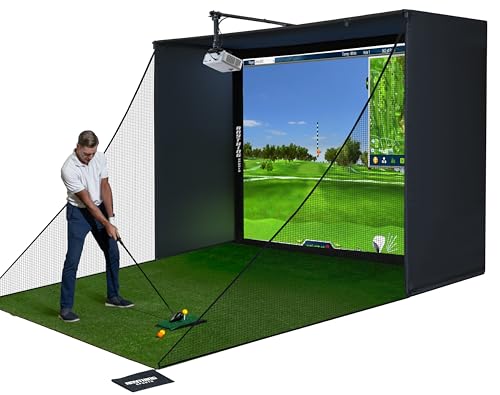
- COMPLETE GOLF SIMULATOR ENCLOSURE — TRAIN WITH CONFIDENCE – Designed for serious golfers who want a professional-grade practice space at home and beginners looking to practice their swing. This all-in-one golf simulator cage delivers durability, safety, and a clean visual setup—without the complexity or cost of high-end custom builds.
- PROJECTOR MOUNT INCLUDED: The best-selling golf simulator enclosure with a projector mount and all poles needed. Huge cost and time saver
- WHAT’S NOT INCLUDED: The turf and projector shown in the images are for demonstration purposes only and are not included with this purchase.
The Complete Golf Simulator Enclosure Package offers a 4K-ready impact screen, blackout cage, projector mount, frame poles, and side shank nets. It is clearly structured as a home or garage practice solution and is priced lower than some of the larger, more premium bundled setups.
This is a good option for buyers who want the enclosure components needed for a simulator build without jumping into the highest price tiers. The inclusion of side shank nets and a projector mount makes it a practical and organized setup for indoor practice.
Its 12-month warranty adds a layer of reassurance, and the package is aimed at users who want an easier setup experience. If you already have or plan to add a launch monitor, this enclosure package can help bring the rest of the system together.
Pros
- Includes impact screen, blackout cage, projector mount, and frame poles
- Side shank nets included
- Home and garage friendly
- 12-month warranty
Cons
- Does not include a launch monitor
- Still requires room for a full enclosure setup
6. Best Portable Premium Launch Monitor: Garmin Approach R50

- Fine-tune your form with this premium launch monitor and simulator that utilizes a 3-camera system for precision metrics
- Tap into insights, select courses, review impact videos, or play a virtual round (subscription required) straight from the 10” built-in color touchscreen display
- Use advanced measurements to dial in your swing, including ball speed, launch angle, face to path (included tracking sticker required) as well as improved spin rate and axis both indoors and outside
The Garmin Approach R50 is a premium golf launch monitor and simulator with a 10-inch built-in color touchscreen display. That built-in display makes it stand apart from simpler portable units and gives it a more self-contained feel for home practice.
As a premium launch monitor, it is aimed at golfers who want a high-end portable simulator experience rather than a full enclosure package. It can be used as the core of a home setup or taken into other practice environments, depending on the user’s needs.
Its price places it among the most expensive products in this list, so it is best suited to golfers who want a top-tier monitor with integrated display features. If you value portability and premium design in one device, this is a standout option.
Pros
- Built-in 10-inch color touchscreen display
- Premium launch monitor and simulator
- Useful for home or portable use
- Strong choice for a high-end filtered setup
Cons
- Very expensive
- Does not include enclosure or mat
7. Best Budget-Friendly Simulator Game: PHIGOLF Home Golf Game Simulator
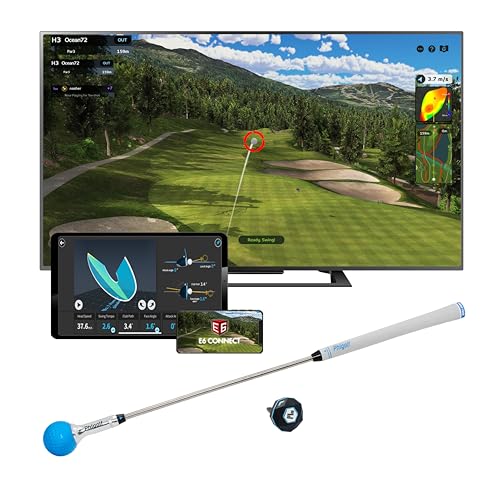
- SETUP INSTRUCTIONS: Refer to the user manual for setup, app download, and Bluetooth pairing, and watch the video below for assistance. For troubleshooting, check the tutorials in our Phigolf app.
- Premium Portable & Space-Saving: Take Phigolf2 Flex anywhere — it fits easily in your suitcase, making it perfect for travel. No net or ball required. Designed for indoor use with minimal space, so you can play anytime, anywhere.
- Access 38,000+ Golf Courses Worldwide: Experience world-famous courses from the comfort of your home. With Phigolf, you can explore over 38,000 courses globally, from local favorites to bucket-list destinations. Plus, enjoy 9 classic and 8 HD courses included in the Phigolf app for endless variety and fun.
The PHIGOLF Home Golf Game Simulator is a motion-sensor and swing-stick based system designed for indoor and outdoor fun. It offers access to 38,000+ courses worldwide and works with Android, iOS, the app, and E6 Connect.
This product is much more accessible than the larger studio systems on this list, making it appealing for users who want an entertaining and flexible golf experience without building a full simulator bay. The included motion sensor and swing stick keep the setup relatively compact.
If you want a home golf simulator that focuses more on playability and convenience than a dedicated hitting enclosure, this is a compelling low-cost choice. It’s especially useful for casual golfers or families who want interactive golf fun at home.
Pros
- Affordable compared with full simulator packages
- Works indoors and outdoors
- Compatible with Android, iOS, app, and E6 Connect
- Access to 38,000+ courses worldwide
Cons
- Not a full enclosure-based simulator
- Less advanced than premium launch monitor systems
8. Best Mid-Range Launch Monitor: Rapsodo MLM2PRO
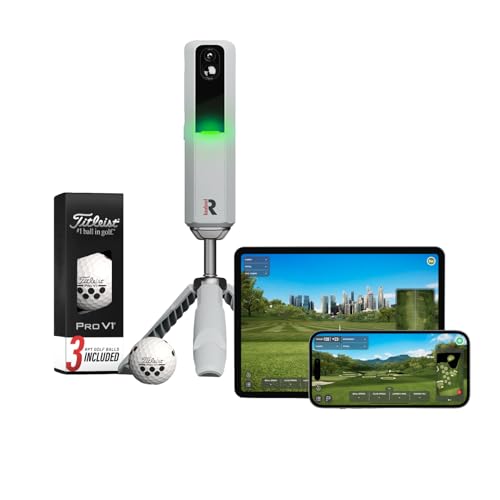
- TOUR LEVEL SHOT TRACK ACCURACY — Doppler radar & dual camera setup ensure reliable data on every shot to help you improve faster.
- 15 KEY METRICS CAPTURED — measure spin rate, spin axis, carry distance, club speed, club path, launch angle, and more.
- 45 DAY PREMIUM TRIAL INCLUDED — Unlock simulated courses, 3rd party app integration, target range, impact vision, rapsoo combine, and speed training with your free trial premium membership.
The Rapsodo MLM2PRO Launch Monitor is a swing trainer and shot tracker designed for home use and the driving range. It includes 3 ProV1 balls and is presented as a serious training aid for golfers who want tracking and practice support from a portable device.
This product is appealing because it delivers launch monitor functionality without requiring a full simulator enclosure. It can fit into a compact home setup, which makes it useful for golfers who need a more flexible practice tool.
With a 4.1 rating and a price below many premium bundled packages, it sits in a middle ground that may suit golfers seeking a balance between capability and portability. It’s a smart choice if you want training data without a full room buildout.
Pros
- Portable launch monitor and shot tracker
- Suitable for home or driving range use
- Includes 3 ProV1 balls
- Good middle-ground option
Cons
- Does not include enclosure or screen
- Not as complete as a studio package
9. Best Portable Simulator Choice: Garmin Approach R10

- Work to improve your game at home, indoors or on the driving range with a portable launch monitor .Waterproof : IPX7.Control Method:Application,VoiceWater Resistant: Yes.Club Head speed accuracy : plus/- 3 mph, Ball speed accuracy : plus/- 1 mph, Launch angle accuracy : plus/- 1 degree, Launch direction accuracy : plus/- 1 degree.
- Track key metrics when paired with a compatible smartphone with the Garmin Golf app to help better your shot consistency, including club head speed, ball speed, swing tempo, ball spin, launch angle and more
- Understand your golf strengths and areas for improvement by using training mode, which tracks stats for each club and shows a shot dispersion chart based on estimated ball flight using the Garmin Golf app
The Garmin Approach R10 is a portable golf launch monitor designed for indoor use or the driving range. It offers up to 10 hours of battery life, which gives it practical flexibility for golfers who want portable practice sessions.
As a compact monitor, it’s well suited to users who are building a smaller home setup or who want a device they can bring to different practice locations. It gives you simulator-style training without the commitment of a large enclosure package.
This product is a strong fit for golfers who prioritize portability and manageable cost over a full studio environment. It’s one of the most recognizable compact options in the lineup and remains a solid home training choice.
Pros
- Portable and easy to use
- Indoors or driving range use
- Up to 10 hours battery life
- Good for compact setups
Cons
- Does not include enclosure components
- Less immersive than full simulator packages
10. Best Simple Screen Accessory: Golf Simulator Impact Screen

- Premium Construction Golf Impact Screen: Level up your practice sessions with our expertly crafted golf screen. Featuring a triple-layer design comprising an HD outer layer, an ultra sound damping middle layer, and impact-resistant inner layer, our screen ensures maximum durability and performance.
- Commercial Grade Hitting Screen: Step up your game with confidence knowing that our heavy-duty golf simulator screen is built to endure thousands of ball impacts. Whether you're honing your skills at home or managing a bustling golf facility, our screen delivers exceptional reliability and longevity.
- Ultra Sound Damping Golf Screen: Practice your golfing in peace with our innovative middle layer technology, designed to absorb vibrations and minimize sound resonance. Enjoy quiet and focused training sessions, even at high volumes, for an immersive golfing experience like no other.
The Golf Simulator Impact Screen is a premium triple-layer launch monitor projector screen designed for enclosure and net setups. It focuses on the screen portion of a simulator build, making it a valuable part of a larger indoor practice environment.
With HD visuals and grommets plus bungee cords included, this screen is intended to be practical for installation in a home bay or net-based setup. It is not a complete simulator on its own, but it can significantly improve the presentation of an existing build.
For buyers who already have the core pieces of a simulator and need a durable screen component, this is a useful accessory. Its high rating suggests strong user satisfaction as a screen-focused product.
Pros
- Premium triple-layer construction
- Includes grommets and bungee cords
- Suitable for enclosure or net setups
- Designed for HD visuals
Cons
- Not a complete simulator
- Requires other equipment to be useful
11. Best Practice Mat Option: GoSports Golf Simulator Turf
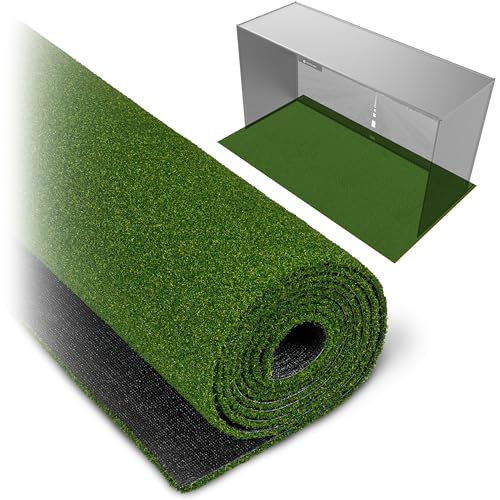
- PROFESSIONAL LOOK: Elevate your home simulator setup with premium, commercial grade golf turf; Designed to sit underneath your sim enclosure or hitting net for a finished high-end look inspired by professional golf studios
- SAFER PRACTICE: Helps dampen golf balls as they rebound from impact for smoother, more realistic practice and minimizes ricochets on hard surfaces
- MODULAR SETUP: Choose between 10, 12, or 15 ft widths to match your sim enclosure; All turf sizes measure 6 ft deep; Buy 1, 2, or 3 turf sections based on your setup
The GoSports Golf Simulator Turf is a 15 mm elite golf mat for indoor home setups and comes in 10, 12, or 15 foot sizes. It is designed to serve as the turf foundation of a simulator space or practice area.
This mat is especially useful when building a simulator from multiple components, since a comfortable and functional hitting surface can make a major difference in practice quality. The available sizes also make it easier to match different room dimensions.
It is not a full simulator by itself, but it is a practical and necessary addition for many home golfers. If you already have a launch monitor or are planning a larger build, this turf can help complete the setup.
Pros
- Elite 15 mm golf mat
- Available in multiple sizes
- Useful for indoor home setups
- Good foundation piece for a simulator build
Cons
- Not a complete simulator
- Requires other components for full use
12. Best Affordable Net Setup: Golf Net with Practice Mat
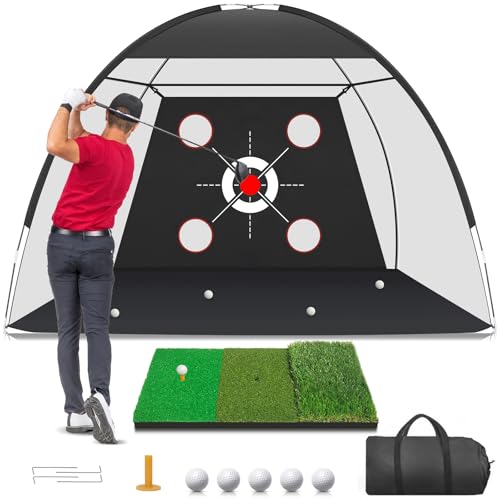
- 【Multiple Target Golf Net- Golf Simulators for Home 】Our 10*7ft golf hitting net features a central bullseye target and target pockets in four directions. Whether you are practicing your golf driving, swing, putting, or chipping, this durable golf net provides a variety of training targets to improve your skills. Whether you are a beginner, enthusiast, or an experienced golfer, this golf practice accessory is designed to improve your game and help you reach your full potential on the course.
- 【Upgraded Durable, Impact-Resistant Material】We have fully upgraded the quality of the golf net, encrypted and thickened to ensure that it is not easily torn by the impact of golf balls. This set of golf equipment is made of 600D Oxford cloth, 270g high-density nylon net, and 0.45-inch thick reinforced fiberglass structure, which has excellent durability and impact resistance. You can achieve high-intensity golf swing practice indoors/outdoors, release your passion and enjoy the fun of golf
- 【Portable Golf Practice Net Set】Our golf swing trainer comes with a 3-in-1 turf golf mat, 5 golf balls, 1 rubber tee, 1 large-capacity carry bag and 4 ground stakes. The portable design allows all accessories to be placed in a carry bag, which is convenient for outdoor and indoor golf practice. Various targets help players focus on various aspects of swinging, chipping, hitting and driving. These are ideal golf accessories for men/women.
This Golf Net package includes a 10x7FT net and a golf practice mat, making it a simple and affordable option for backyard, indoor, or outdoor swing practice. It is aimed at golfers who want a compact hitting setup rather than a full simulator build.
The inclusion of targets helps make practice more structured, which can be appealing for players working on swing consistency and basic chipping or driving drills. Because it’s a smaller setup, it is easier to fit into more spaces than a large enclosure system.
While it doesn’t provide the immersive experience of a simulator screen and launch monitor, it is a practical and budget-friendly training aid. For many golfers, it’s a good starting point before moving into a more advanced home simulator.
Pros
- Affordable practice setup
- Includes net and practice mat
- Suitable for indoor or outdoor use
- Compact and easy to manage
Cons
- Not a full simulator
- Limited compared with launch monitor systems
13. Best Full Cage-and-Screen Setup: Complete Golf Simulator Enclosure Package 2
- COMPLETE GOLF SIMULATOR ENCLOSURE — TRAIN WITH CONFIDENCE – Designed for serious golfers who want a professional-grade practice space at home and beginners looking to practice their swing. This all-in-one golf simulator cage delivers durability, safety, and a clean visual setup—without the complexity or cost of high-end custom builds.
- PROJECTOR MOUNT INCLUDED: The best-selling golf simulator enclosure with a projector mount and all poles needed. Huge cost and time saver
- WHAT’S NOT INCLUDED: The turf and projector shown in the images are for demonstration purposes only and are not included with this purchase.
This Complete Golf Simulator Enclosure Package brings together the key enclosure components needed for indoor or garage practice. It includes a 4K-ready impact screen, blackout cage, projector mount, frame poles, and side shank nets, which makes it a strong structural base for a simulator area.
Because it is focused on the enclosure and protection side of the setup, it is especially useful for golfers who already have or plan to pair it with a launch monitor and projector. The setup is designed to help create a more complete and organized home golf environment.
The package also comes with a 12-month warranty, adding practical value for buyers who want some assurance with their purchase. If you’re building a simulator around a separate monitor, this is a solid enclosure-focused solution.
Pros
- Includes impact screen, cage, mount, poles, and nets
- 4K-ready screen
- Good for indoor and garage practice
- 12-month warranty
Cons
- Does not include a launch monitor
- Needs enough space for a full enclosure setup
14. Best Starter Launch Monitor: Voice Caddie SC4 PRO

- Pro-Grade Accuracy with Prometrics Engine: The SC4 Pro golf launch monitor and golf shot tracker delivers precise ball and club head data, tracking from swing to impact to ball flight, offering unmatched real-time accuracy for both indoor and outdoor practice.
- Access to 3D Driving Range and E6 Connect Included: Enjoy the 3D Driving Range and E6 Connect home golf simulator with your SC4 PRO, enhancing your practice with immersive virtual experiences.
- Connect to VOICECADDIE S App: Unlock advanced features like high-level statistical analysis, distance calibration, swing speed radar and more through the VOICECADDIE S app, providing you with detailed insights to improve your golf swing and overall game.
The Voice Caddie SC4 PRO Golf Launch Monitor and 3D Driving Range Simulator is built for indoor and outdoor use. It is a portable swing analyzer and golf tracker with a built-in screen and no fees, which makes it appealing for straightforward practice.
This product is a good fit for golfers who want a compact launch monitor with local display convenience rather than a full room-based simulator build. The built-in screen can make it easier to review practice sessions without additional devices.
At its price point, it occupies a competitive middle zone between basic portable aids and premium studio packages. For users seeking a no-fuss training tool, it is an accessible way to bring simulator-style practice home.
Pros
- Built-in screen
- No fees
- Indoor and outdoor use
- Portable and practical
Cons
- Not a complete simulator setup
- Limited compared with full enclosure packages
15. Best Compact Training Game: Rapsodo Mobile Launch Monitor
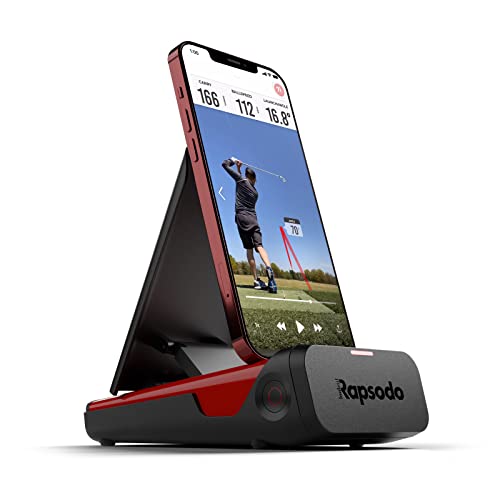
- Pro-Level Golf Launch Monitor with GPS Tracking – The Rapsodo mobile launch monitor delivers tour-level accuracy for shot distance, ball speed, club speed, and launch angle, with GPS satellite view for precise shot tracking.
- Golf Simulators for Home & Outdoor Use – Transform any space into a golf simulator with real-time swing analysis, shot shape tracking, and interactive games, creating a complete full swing golf simulator experience.
- Golf Swing Analyzer with Video Playback – Improve your game with a golf swing analyzer that records every shot, providing video playback and active shot tracers to help you visualize ball flight and refine your swing.
The Rapsodo Mobile Launch Monitor is an indoor and outdoor simulator tool designed for golfers who want swing analysis and tracking in a compact form. It measures ball speed, club speed, and launch angle, and it also includes GPS satellite view for added context.
This model is iPhone and iPad only, so it is best suited to users already in that ecosystem. Within those limitations, it provides a focused and portable way to work on golf performance at home or at the range.
For golfers who want a simpler, lower-cost entry into simulator-style training, this device offers strong functionality in a small package. It is a practical choice for skill work when a full enclosure setup is not necessary.
Pros
- Measures ball speed, club speed, and launch angle
- Indoor and outdoor use
- Compact and portable
- Good training-focused option
Cons
- iPhone and iPad only
- Not a full simulator system
Buying Guide
Choosing the Best Golf Simulator For Home starts with understanding the kind of experience you want. Some golfers want a complete indoor golf room with an enclosure, screen, projector, mat, and launch monitor. Others just want a portable monitor or a small practice net to improve their swing. Matching the product to your room, budget, and practice habits is the best way to avoid disappointment.
Key Buying Criteria
Space and Room Size
Measure your available area before buying anything. Enclosures and studio packages need more room than portable launch monitors or net setups. Ceiling height, swing clearance, and depth all matter when planning a home simulator.
Type of Setup
Decide whether you want a full simulator package, a launch monitor, an enclosure kit, a screen accessory, or a simple practice net. The products in this list cover those different needs, so the right choice depends on how complete you want your setup to be.
Portability
If you need something easy to move or use in different places, a portable launch monitor or a compact training device may be better than a full enclosure. Portability can be a major advantage for golfers who practice in more than one location.
Compatibility
Check compatibility carefully, especially with software, apps, and devices. Some products work with Android and iOS, while others have platform limitations. If you want to use a certain app or simulator software, make sure the product supports it.
Budget
Home simulator prices vary widely, from budget-friendly nets and portable monitors to premium studio packages. A higher price often means more components included, but not every golfer needs a full build. Choose the level that matches your goals rather than overspending on features you may not use.
Included Components
Some products are complete bundles, while others provide only one part of a simulator system. Review what is included so you don’t end up missing key items like a launch monitor, mat, screen, or enclosure. Complete bundles can simplify setup, but modular products may offer more flexibility.
Warranty and Support
Warranty coverage can add peace of mind, especially for larger purchases. Products like enclosure packages may include warranty terms that help protect your investment. For premium home builds, support and coverage are worth considering along with the specs.
Frequently Asked Questions
What is the best golf simulator for home use?
The best option depends on your space, budget, and how immersive you want the setup to be. Complete studio packages are best for a full simulator experience, while portable launch monitors are better for smaller spaces and simpler practice needs.
Do I need a full enclosure for a home golf simulator?
No, not always. A full enclosure is helpful for a more realistic and protected setup, but many golfers use launch monitors, nets, or mats without an enclosed hitting bay.
Are portable launch monitors good for home practice?
Yes. Portable launch monitors can be a practical way to work on swing data and shot tracking at home. They are especially useful when space is limited or when you want to practice in more than one location.
What should I check before buying a simulator package?
Check the included components, space requirements, compatibility, and whether the package includes a launch monitor, screen, projector, or mat. It’s also important to see whether the product matches your current skill level and practice goals.
Can I build a simulator gradually?
Yes. Many golfers start with a launch monitor or practice net and then add an enclosure, screen, projector, or mat later. This approach can make it easier to manage cost and build the setup over time.
Conclusion
The Best Golf Simulator For Home depends on whether you want a premium all-in-one studio, a strong enclosure setup, or a compact portable training tool. If you want the most complete experience, bundled studio packages are hard to beat. If you want flexibility or a lower cost, portable launch monitors and practice nets can still deliver excellent home practice value.
For most buyers, the smartest choice is the one that fits your room and your routine. Start with the core you need most, then build out the rest of your simulator setup over time. That way, you can create a home golf experience that feels practical, enjoyable, and tailored to your space.